
Phishing awareness training is probably the most widely used preventative cybersecurity measure. Most businesses know they need it, and there are plenty of ways to roll it out across a workforce. Staff are regularly reminded to look for spelling mistakes, check domains, be wary of suspicious attachments and avoid fake Microsoft 365 login pages.
That advice still has a place. Basic phishing emails still exist, and a poorly written email from a strange domain should still make people pause. The issue is that many of the phishing incidents we see at Strand no longer start with something that looks obviously fake.
Modern phishing often looks like normal work. The email may come from someone the victim knows. The link may be a genuine SharePoint or OneDrive link. The login page may be Microsoft's real login page. The message may be short, well written and relevant to the recipient's job, supplier relationships or current workload. In many cases, the email will pass the checks staff have been trained to perform.
This is why phishing awareness needs to move on. The question is no longer just "does this email look suspicious?" A better question is "what is this email asking me to do, and does that make sense?"
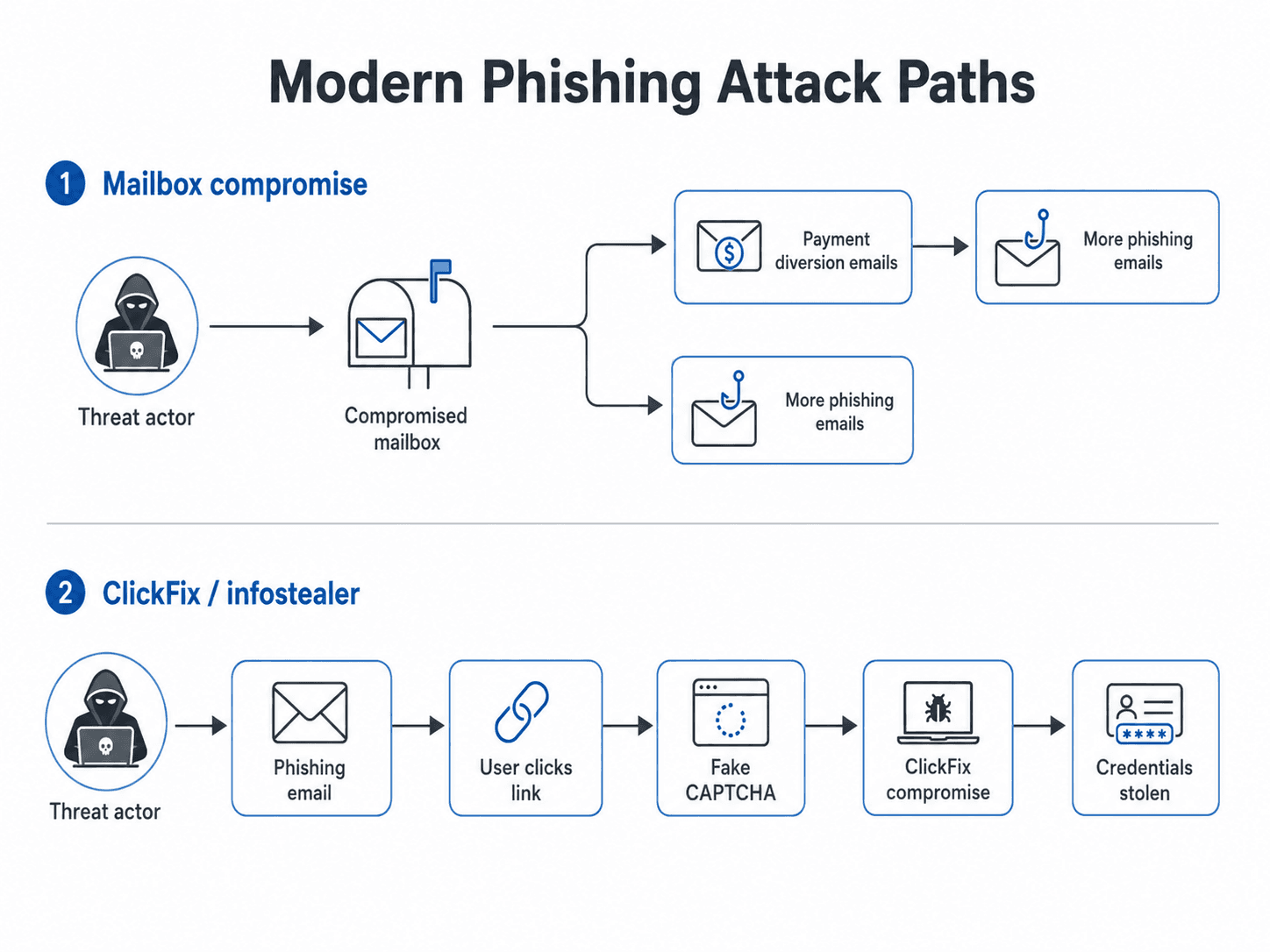
The modern phishing pattern
A lot of modern phishing starts with mailbox access. Once a threat actor gets into an email account, they rarely act at random. They usually spend time reading.
They look for invoices, payment conversations, supplier relationships, purchase orders, legal matters, customer bookings and internal approval chains. They want to understand how the business works and where the financial reward for them exists. They want to know who trusts the compromised account, who approves payments, who handles supplier queries and which conversations are already active.
If they find a useful payment thread, they may try to divert the payment. This can be as simple as sending an updated invoice, changing bank details or inserting themselves into an existing conversation at the right moment. The email may look convincing because it comes from a real account and may sit inside a real thread.
If they do not find an obvious payment opportunity, they often use the mailbox to send further phishing emails. This might involve SharePoint links, fake document shares, device code phishing, credential harvesting pages or messages designed to compromise more accounts. One compromised mailbox can therefore become a route into customers, suppliers, partners and colleagues.
ClickFix sits slightly apart from this pattern. These campaigns are usually more malware-led. Rather than starting with a mailbox and looking for a payment to divert, the attacker tries to make the user run something on their device. The aim is often to deploy an infostealer, collect saved passwords, browser cookies, session tokens, VPN credentials and remote access details, then sell or reuse that access later.
In simple terms, mailbox-led phishing is usually about using trust and business context. ClickFix is usually about infecting the device and stealing useful credentials.
What current phishing emails look like
Older phishing often tried to imitate Microsoft 365 badly. The page looked wrong, the domain was strange, the wording was clumsy and the email was generic. Those attacks still happen, but they are not the whole picture.
Current phishing is often built around legitimate services and real relationships. Attackers use Microsoft 365, SharePoint, OneDrive and compromised mailboxes because those things are already trusted inside most organisations. The email does not need to look dramatic. In fact, the more ordinary it looks, the better it often works.
The examples below cover the phishing styles we are seeing most often: SharePoint lures, known-sender phishing, device code phishing and ClickFix pages.
SharePoint lures
SharePoint phishing works because the first email can be legitimate. A threat actor compromises a Microsoft 365 account, uploads or creates a document in SharePoint or OneDrive, then shares that document with people from the victim's address book. The recipients receive a real Microsoft sharing notification from a real Microsoft domain.
From the recipient's point of view, this can be difficult to spot. The sender may be someone they know. The branding is correct. The link goes to SharePoint. The email does not contain a suspicious attachment. There may be no spelling mistakes, no strange domain and no fake Microsoft login page in the email itself.
The phishing content usually appears after the user opens the shared file. The document may contain a button to "view", "open", "download" or "review" the file. It may ask the user to sign in again, click a second link, approve access or complete another step. By that point, the user has already interacted with a genuine Microsoft sharing email and may feel they are inside a trusted workflow.
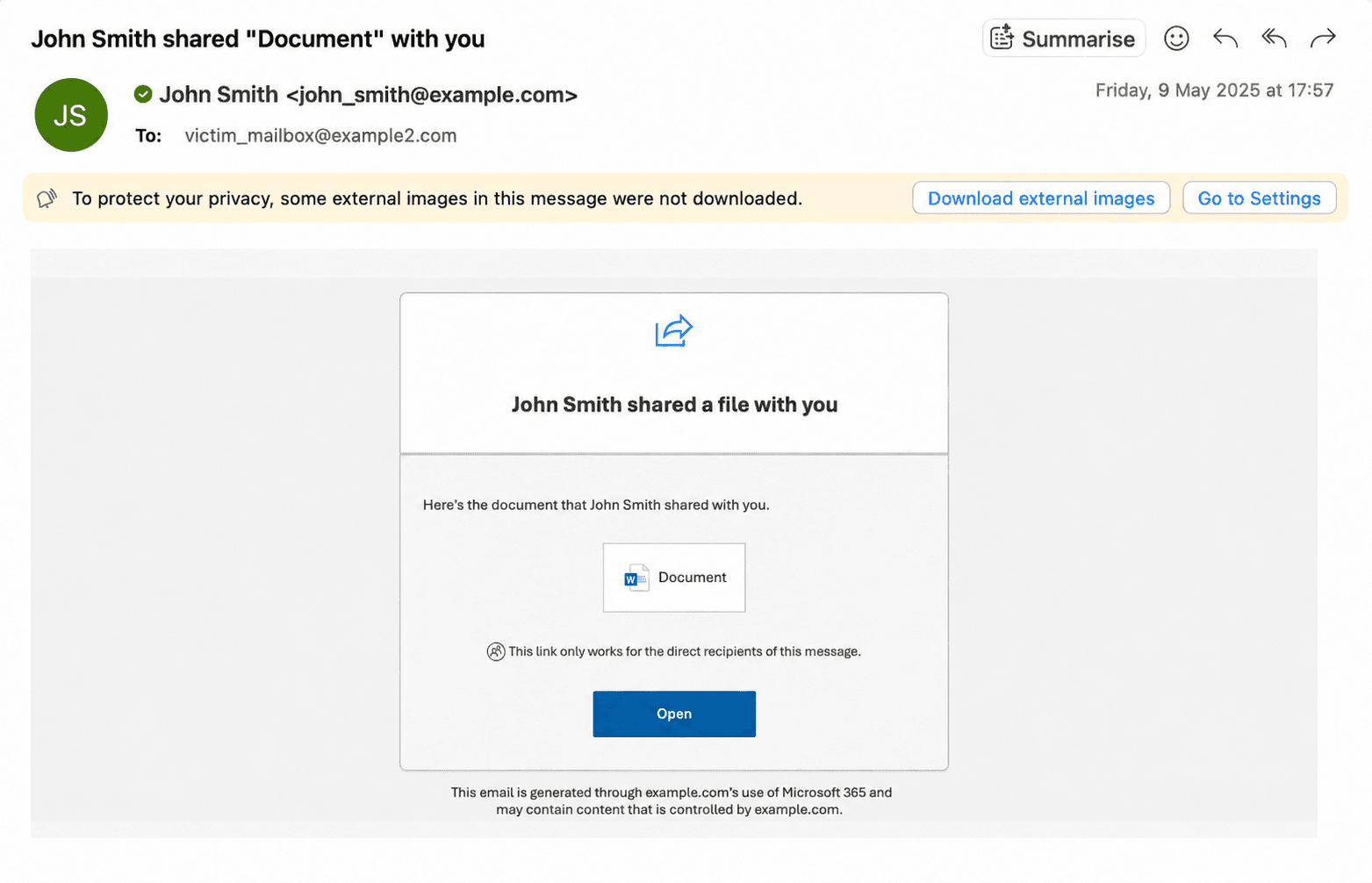
Training point
A real SharePoint notification is not automatically safe. SharePoint is a legitimate business tool, but it can still be abused when the account sharing the file has been compromised.
Staff do not need to become technical analysts. They need practical checks. Were they expecting the file? Does the sender normally share documents with them? Does the filename make sense? Does the document contain real content, or is it mainly a button asking them to continue elsewhere?
For sensitive or unexpected files, staff should verify through a separate route. That might mean starting a new Teams message, calling the sender or using a known supplier contact number. Replying to the original email is not enough, because if the sender's mailbox is compromised, the attacker may be the person who replies.
Known-sender phishing
A lot of phishing training asks staff whether they know the person emailing them. That is a useful question, but it has become less reliable on its own.
In many incidents, the sender is known. The email comes from a real account. It may be part of an existing conversation. It may use the sender's real signature. It may refer to a real matter, invoice, booking, project or customer. This happens because attackers use compromised mailboxes to understand relationships before sending the next message.
Once inside a mailbox, an attacker can see who deals with payments, which suppliers are trusted, what tone people use, when invoices are due and which documents are expected. They can continue a thread rather than starting a new one. They can make a short message look normal because many real business emails are short.
A known-sender phishing email might say, "Please see the updated invoice attached", "Can you review this before close of play?", "Sharing the revised booking list", "Please confirm the attached payment details", or "Updated document shared here." None of those messages are suspicious by themselves. The risk comes from the context, the timing and the action being requested.
Staff should be trained to look for changes in behaviour rather than only changes in appearance. Is the request normal for this person? Is the timing unusual? Has the conversation moved to a new link or portal? Is there sudden urgency around payment, document approval or access? Overall, all staff should know that changes or updates to payment information require validation over the phone, never by email, every single time without exception. This one step may not stop your emails being compromised, but it can help you not lose money to a threat actor.
This matters most for finance, HR, legal, operations, executive assistants, sales teams and anyone handling customer portals, supplier systems, payroll, remote access or bank details. Any request to change payment details should be verified outside email using a known contact route. The phone number or contact details in the suspicious email should not be used for that verification.
A known sender should reduce suspicion, but it should not remove it completely. The relationship may be genuine. The request may still need checking.
Device code phishing
Device code phishing is effective because it uses a real Microsoft login process.
Device code authentication exists for situations where a device or application cannot easily handle a normal login screen. A meeting room device, printer, TV app or command-line tool might show a short code and ask the user to enter it on Microsoft's device login page. In the normal version, the user starts that process because they are setting up something they are actually using.
In the phishing version, the attacker starts the process. They generate a device code from their own system, then send the victim a message asking them to enter that code into Microsoft's real device login page. The message may claim the code is needed to view a document, listen to a voicemail, access a secure message, join a meeting or review an invoice.
The victim may then visit a genuine Microsoft page and complete MFA. That is what makes the attack confusing. The user is not necessarily typing their password into a fake Microsoft page. They may be using a real Microsoft page, but the code they enter is linked to the attacker's login session.
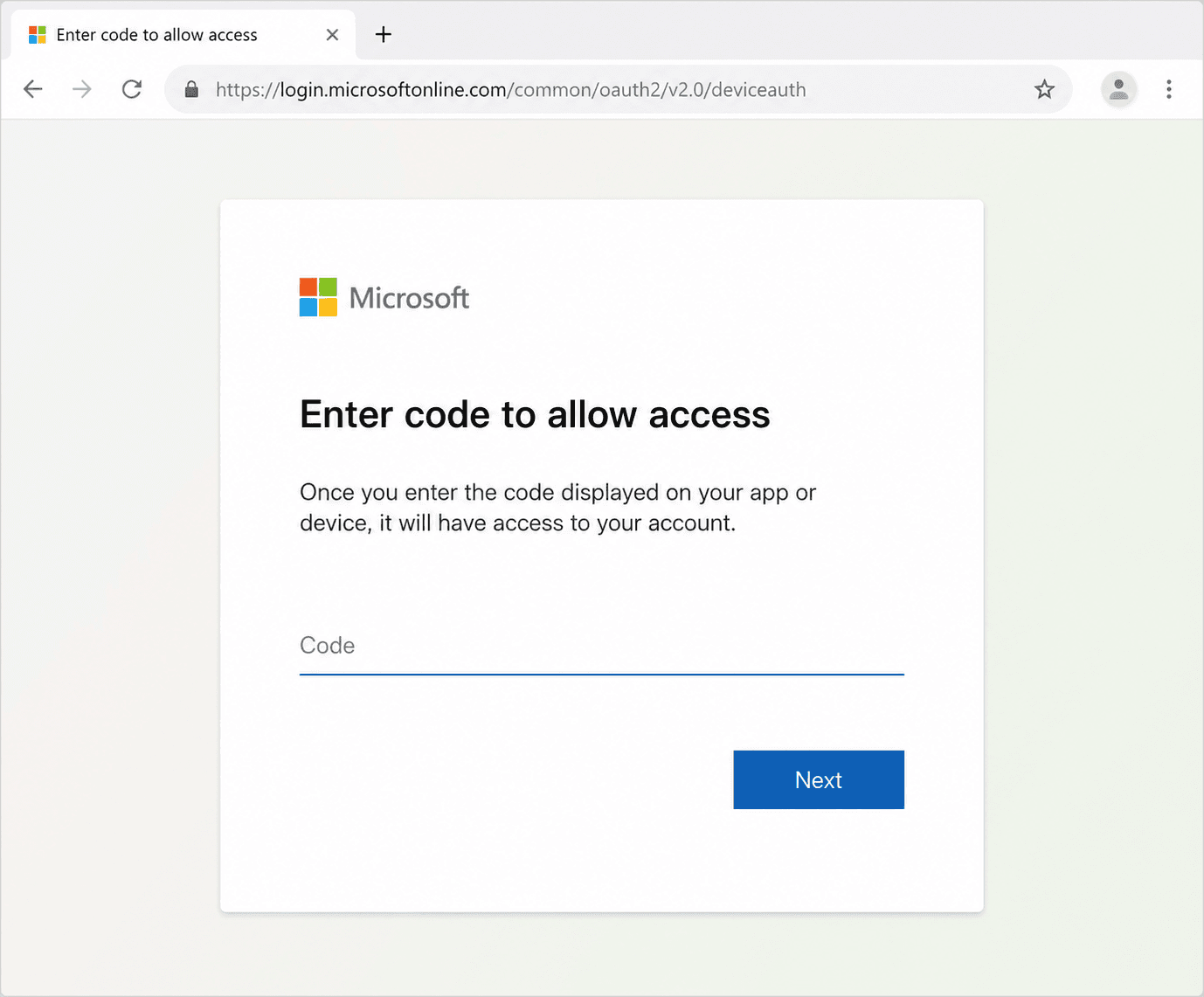
Control recommendation
It is rare to use device code authentication in the normal course of business. A code shown on a meeting room device you are setting up may be legitimate. A code sent by email, PDF, Teams message, voicemail notification or shared document should be treated as suspicious.
Better yet, businesses should block device code authentication across their tenant where it is not needed.
ClickFix pages
ClickFix is a different type of phishing. The user is not only asked to click a link or enter a password. They are guided into running a command on their own computer.
A ClickFix page often looks like a fake CAPTCHA, browser error, document loading issue, booking notification, update prompt or "verify you are human" page. It tells the user there is a simple problem to fix before they can continue. The instructions usually look straightforward, especially to someone who is busy and just wants to access the page.
On Windows, the page may tell the user to press Windows and R, paste a command, then press Enter. On macOS, it may tell them to open Terminal, paste a command and press Return. The page may describe this as a verification step, browser repair or access fix.
In reality, the command downloads or runs malware. In many ClickFix attacks, the malicious command has already been copied to the user's clipboard by the webpage. The user thinks they are pasting a harmless code. They are actually pasting an instruction that launches the attacker's payload.
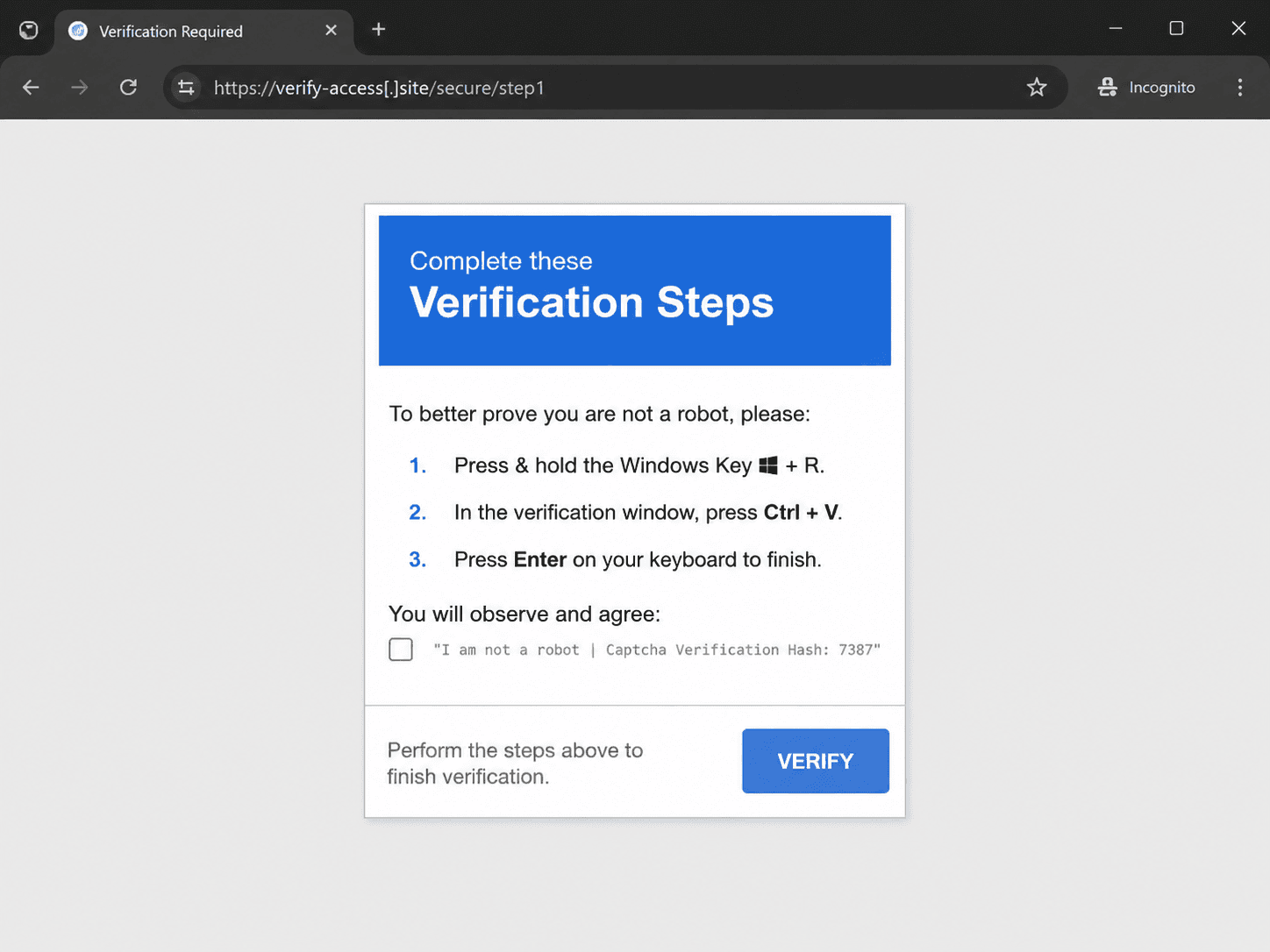
ClickFix commonly delivers infostealers. An infostealer is malware designed to collect useful data from the device, including saved browser passwords, session cookies, authentication tokens, autofill data, VPN credentials, remote access details and other information that can help attackers log in elsewhere.
This is why ClickFix can lead to incidents beyond the original webpage. The device may not lock. There may be no ransom note. The user may close the browser and continue working. The real impact may appear months later when stolen credentials are used to access a mailbox, supplier portal, VPN, remote desktop service or customer system.
The training message should be direct: no legitimate website should ask a user to open Run, PowerShell, Command Prompt or Terminal and paste a command to prove they are human. A CAPTCHA should not need PowerShell. A document should not need Windows Run. A booking portal should not need Terminal.
If a user sees those instructions, they should close the page and report it. If they have already followed the instructions, they should report it immediately. This needs to be handled without blame, because fast reporting gives the organisation the best chance of containing the malware and rotating any exposed credentials.
Strand has also published a related case study on active ClickFix campaigns in hospitality: ClickFix hotel investigation.
What staff should be trained to do
Modern phishing awareness should focus on the action being requested, not only the appearance of the email. Staff should still look for strange domains, spelling mistakes and suspicious attachments, but they should also pause when the request involves something more sensitive.
That includes unexpected shared files, second-stage links inside documents, device codes they did not request, MFA prompts they did not initiate, payment detail changes, requests to bypass normal process and any webpage asking them to run a command.
A practical staff message
If a shared file is unexpected, verify it another way. If a known sender asks for something unusual, check the request through a separate route. If a Microsoft device code appears in an email or document, do not enter it. If a website asks you to paste a command into Run, PowerShell, Command Prompt or Terminal, close it and report it. If a payment detail changes, verify it using a known contact method.
This kind of training is easier for staff to apply because it matches how these attacks actually appear. It does not ask them to spot every technical detail. It gives them clear moments where they should stop, check and report.
What organisations should do
Staff awareness is important, but it should not carry the whole burden. Organisations should also reduce the routes attackers commonly use and make detection easier when something gets through.
For Microsoft 365 environments, device code authentication should be blocked or restricted where it is not needed. SharePoint and OneDrive external sharing should be reviewed. Security teams should monitor for unusual sharing activity, new inbox rules, suspicious forwarding, new MFA methods, unfamiliar sign-ins and unexpected OAuth application consent.
For ClickFix, organisations should look for browsers asking users to paste content into their device, launching tools such as PowerShell, Command Prompt, mshta, wscript or similar utilities.
Response playbooks should reflect the attack type. Mailbox compromise should include session revocation, token revocation, inbox rule checks, MFA review, sign-in analysis, enterprise app reviews and a review of emails or files accessed. ClickFix should be treated as possible malware execution, with investigation of what ran, what was downloaded, what credentials may have been exposed and whether those credentials were used elsewhere. Strand can do all of this autonomously.
Final thought
Modern phishing works because it blends into normal business processes. It uses shared documents, known senders, Microsoft login flows and simple browser prompts because staff already encounter those things every day.
The answer is not to make people suspicious of everything. The answer is to train staff on the moments that matter: unexpected files, unusual payment requests, device codes they did not request, webpages asking them to run commands and known senders behaving out of pattern.
If your business has faced these threats before and wants to see what autonomous forensic investigation looks like, drop us an email at [email protected].
Modern Phishing
Train your team to spot modern phishing attacks
A short employee-facing PDF you can share with the whole company.